The Lovely Land of Lending Models: Best Practices for your Collection and Sanity
If you’ve talked at all with your team at OverDrive, you’ve probably heard about the plethora of lending models available in our Marketplace. We know that digital collection development in OverDrive is not your only job responsibility…heck, it’s probably just 1/16 of all the things you have to do at your library! The goal of this blog post is to help you get a handle on types of lending models, when you may want to use each one, and helpful things to think about when shopping that will hopefully save you administrative time and increase circulation.
Available Lending Models (for North American Public Libraries) in OverDrive’s Marketplace.
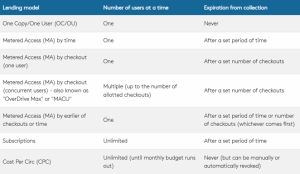
When shopping and using our basic and advanced search, there are various ways to search and filter by particular lending models:
- OC/OU and all types of MA: Can see availability, filter results, and add to cart.
- CPC: Can see availability and filter results. Purchasing CPC will take you to a separate shopping page where you can continue to search and add titles to CPC budgets.
- Subscription/Simultaneous Use: Can see availability. Purchasing will take you to a separate Subscription page where you can search within plans.
In addition to our shopping areas, there are several Marketplace tools that include filtering options for lending models. With all of these tools at your disposal, the question becomes: “How can I use these tools to not only help me make informed purchasing decisions, but also leverage lending models to save time and prevent myself from re-evaluating each time I purchase?” Here are some of our favorite tips, from tried-and-true Digital Content Librarian workflows to strategies librarians around the country have used with success.
Reporting
In all of the following reports, you can filter by lending model in the report parameters. These can be found in the Insights tab in Marketplace.
- Checkouts report
- Title Status and Usage
- Weeding report
Depending on the report and how you like to work, it may be easier to export to Excel and filter, or you can filter and search right in the report within Marketplace.
Purchasing Tools
When it comes to purchasing tools, this is where lending models really shine.
-
Holds Manager
- Can include or exclude lending models within each plan. You can create as many Holds Manager plans as you like!
- When setting up different plans, try setting different target holds ratios for various purchasing factors (e.g. budget, subject, price, publisher, etc.)
- Depending on the parameters of your plan, you can have the plan choose a particular lending model if multiple are available. This can save you time when looking through the cart. If you want to look at more data from the Holds Manager before deciding on a lending model, you can also choose to add the title to the cart for lending model review.
-
Metered Access Manager
- Try setting up different plans for different types of MA content – MA by Time and MA by Checkout can have different return on investment and you may want to look at them individually based on number of circs in the last 12 months or other parameters available to you in the MA Manager.
- Check CPC availability and cost (this is a column in the MA Manager) for expired titles with low holds. This could be a good alternative to purchasing an expensive MA copy that may not get enough use for the cost.
-
Patron Interests Manager (Notify Me Tags)
- You can see CPC availability and price in the manager, which can be helpful for lower-demand titles that still have tags.
Other Best Practices
Blended Purchasing:
- OD MAX/MACU is your High Demand Lifesaver
- Start with 1 OC/OU (“anchor”) copy whenever possible for collection stability
- Not sure how popular a title might be? Start with a 12-month Metered Access copy to help with holds and see if popularity lasts before purchasing a 24-month Metered Access copy.
- Use 12-month licenses for uncertain or short-term demand Use 24-month licenses for steady, ongoing demand
Prioritization with Expiring Metered Access Titles
- Prioritize repurchasing titles with High holds and Recent or consistent usage
- Allow lower demand or titles with no holds to expire – the automated weeding tool is your time-saving friend!
Strategic Cost-Per-Circ usage
- Expanded backlist
- Local interest
- Notify Me tags
- Book Clubs/Community Reads
- LOTE collections
- Temporarily relieve holds on low-cost CPC content
- No budget is too small to help with CPC! One budget can have just one title in it if you want to get specific enough with the amount of money you want to spend on certain types of content.
Not all holds are treated equally
- Accept that some low demand holds may wait or be skipped
- Reassess thresholds on a regular basis
Use OverDrive Special Features to your advantage
- Lucky Day
- Highlight popular backlist titles of which you own several copies
- Do you have MA by Time titles expiring soon that you probably won’t repurchase? Throw them in Lucky Day to get some more checkouts from them without adding more holds before they expire!
I hope this has you fired up to log into Marketplace and start using lending models to make your digital collection management a success! As always, you can reach out to your Digital Content Librarian for ideas and questions.